←Elderbrook x Eli & FurPublishedPublish now
The basicsShows on the event page, Events list, homepage and the city page.
Name
Elderbrook x Eli & Fur
Format
Beatport Live showThe Block (stage at a partner event)TakeoverLivestream
The Block swaps tickets for a link to the host event's tickets and a DJ competition, and switches the page to The Block look.Slug
elderbrook-eli-fur-la
beatport.live/events/elderbrook-eli-fur-la
City
Los Angeles ▾
From the Cities collectionEvent date and start
Oct 1, 2026 · 7:00 PM
Local time (PT)End
Oct 1, 2026 · 10:30 PM
Venue
Beatport HQ
Leave blank for "Secret location"Lineup
Elderbrook, Eli & Fur
Searchable on the Events pageBeatportal article
beatportal.com/articles/1619021-rsvp-now-elderbrook-x-eli-fur-beatport-live-la
Before or after the show. Whenever this has a link, the page shows "Read on Beatportal". Swap in the recap article later if there is one.Flyer (1080×1080)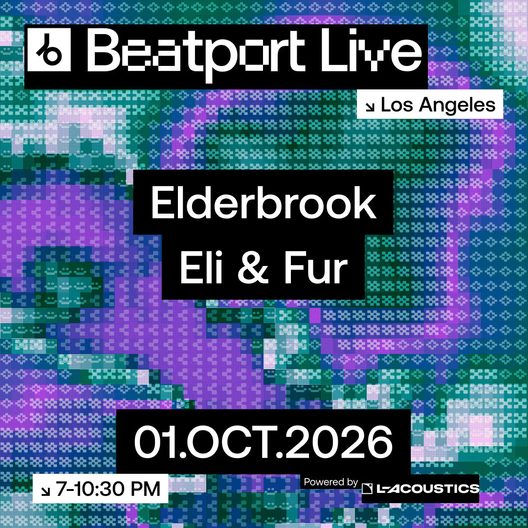 elderbrook-eli-fur.jpg1080 × 1080 · 214 kBUsed on every card and tile. Square only.
elderbrook-eli-fur.jpg1080 × 1080 · 214 kBReplaceDelete
autoNo stage to set. The date and end time decide what the page shows: tickets and RSVP until 10:30 PM on Oct 1, then it moves to Past and the recap fields take over.
Tickets and RSVPWhat people see before the show. Hidden automatically once the event ends.
Button label
Register for freeRSVPTicketsEnter competition
Sold out
Mark this event as sold outMANUAL
OffRegister for free ↘OnSold outJoin the waitlist ↘How the button looks on the event page
The only manual switch on an event. Co:brand drops and Beatport Tickets show sold out by themselves, so the Live team only flips it when needed, e.g. sold out without an embed. Every other state changes by date and end time.Co:brand drop link (free RSVP) embed built for you
https://drop.cobrand.com/d/Beatport/Elderbrook
Paste the drop's link from Co:brand. The page turns it into the form-only embed (…/embed?form_only=true) on its own, so there's no code to copy. The event page already shows the flyer and details, so the form is all it needs.Beatport Tickets link (ticketed shows) embed built for you
https://shop.beatportal.com/dbd7aedb-cad4-43ec-9954-fbd7f712b12c/tickets
Paste the event's shop link from Beatport Tickets. The page turns it into the ticket widget on its own (about 1300px tall), so there's no code to copy. If both links are filled in, Beatport Tickets is used.Waitlist link (Beatport Tickets shows only)
https://drop.cobrand.com/d/Beatport/…
Only needed for paid Beatport Tickets shows: make a Co:brand waitlist drop and paste its link. Co:brand RSVP drops don't need this, because the same drop switches itself to a waitlist once sign-ups close.Or link out instead
https://…
For RA, DICE or other outside ticketing. The button opens this link in a new tab.Lineup and linksShows as artist cards on the event page, each linking to the artist's Beatport page. Leave a set time empty and it shows “Set time TBA”.
ArtistBeatport artist linkSet time
1
Eli & Fur
beatport.com/artist/eli-fur/…
7:30 – 8:45 PM
2
Elderbrook
beatport.com/artist/elderbrook/…
8:45 – 10:30 PM
3
Artist
https://www.beatport.com/artist/…
e.g. 9 – 10:30 PM
4
Artist
https://www.beatport.com/artist/…
e.g. 9 – 10:30 PM
5
Artist
https://www.beatport.com/artist/…
e.g. 9 – 10:30 PM
6
6 artist slots per event (Webflow has no repeating fields, so the slots are fixed). The last filled slot is shown as the headliner. Add set times on the day.Artist
https://www.beatport.com/artist/…
e.g. 9 – 10:30 PM
Show On Beatport on this eventOff for events with no chart or track. Either box left empty is simply hidden.
Beatport chart link embed built for you
https://www.beatport.com/chart/…/902757
Optional. The page builds the Beatport chart embed from it (embed.beatport.com, about 850px tall). One chart per event, e.g. the headliner's.Beatport track link embed built for you
https://www.beatport.com/track/…/28655020
Optional. The page builds the Beatport track player from it (about 165px tall), with play, buy and share.Partners (powered by)Up to 3 sponsor logos, each with an optional link. They show as “Powered by” under the event title, the same on every state.
L-Acoustics logo
Add logo
Add logo
autoAdd to calendar and Share are built from the event's date, times and page link. Nothing to fill in.
Know before you goQuestions and answers for this event only. They show as an accordion on the event page and hide once the event is over.
Show Know before you go on this eventSwitch off and the whole section disappears from the event page. Anything typed below is simply ignored.
⋯ Duplicate itemTip: duplicate the last show in the same city and its answers come with it, so you only change what is different.
1
When will I find out the location?
Confirmed guests get the address by text the day before. Not registered yet? Register here.
2
Can I bring a +1?
No. RSVPs are one per person and names are checked at the door.
3
What time should I arrive?
Doors open at 7 PM. Entry is first come, first served until we reach capacity, so earlier is better.
4
Is there an age limit?
21+ with valid photo ID.
5
Is the venue accessible?
Yes, there is step-free access throughout. Email us if you need anything before you arrive.
6
Is there parking?
Street parking only. We recommend a rideshare.
7
What time is last entry?
9:30 PM.
8Empty. Slots with no question are hidden on the page.
After the showFill these in when content is ready. Each section appears on the page only once its field has something in it.
autoThe recap shows one kind of video, never both: the full set if there is one. No full set? The clips. No clips either? The photo from the night.
1. Full set (YouTube or Twitch)
youtube.com/watch?v=…
Thumbnail, title and length fill in from the link.SoundCloud set
soundcloud.com/…
Beatport chart
beatport.com/chart/…
Shows the tracklist2. Clips (only if there is no full set)
Add Instagram or TikTok links +
Up to 63. Photo from the night (only if there is no full set or clips)
Upload a landscape photo, 16:9
Tags on cards automatic
None yet. Full set, Tracklist, Clips and SoundCloud appear as the fields above are filled.
Where it shows
Show on homepagePast events never show on the homepage, whatever this is set to
Links pageTo put this on beatport.live/links, add a tile in Links and pick this event. You choose where it sits.